fusion-3d-slicer
JT 3D Slicer Pro for Autodesk® Fusion®
Professional 3D slicing plugin for laser cutting preparation



🎬 Demo Video
https://github.com/jtplugin/fusion-3d-slicer/assets/demo-3d-slicer-pro.mp4
Transform 3D models into laser-cut parts with professional precision
✨ Features
🔧 Parametric Slicing
- Slice along X, Y, or Z axis with precision
- Custom thickness support (0.1mm to 5cm)
- Real-time calculation of slice count
- Smart preview with total dimensions
🎯 Professional Workflow
- One-click operation - select body and slice
- Timeline organization with automatic grouping
- Sequential naming with customizable prefixes
- Undo-friendly operation history
🏭 Digital Fabrication Ready
- Laser cutting optimized output
- Material thickness accurate slicing
- Assembly-ready numbered parts
- Export-friendly organized bodies
🚀 Quick Start
Installation
- Download from Autodesk App Store (coming soon)
- Or install manually:
- Download latest release
- Extract to Fusion Add-ins folder
- Restart Fusion
Usage
- Open your 3D model in Fusion
- Modify → 3D Slicer Pro
- Select body to slice
- Choose axis and thickness
- Click OK and let the magic happen! ✨
📸 Screenshots
Plugin Interface
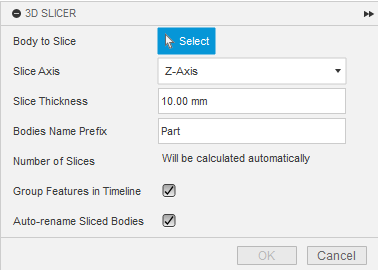
Clean, intuitive interface with real-time calculations
Before & After
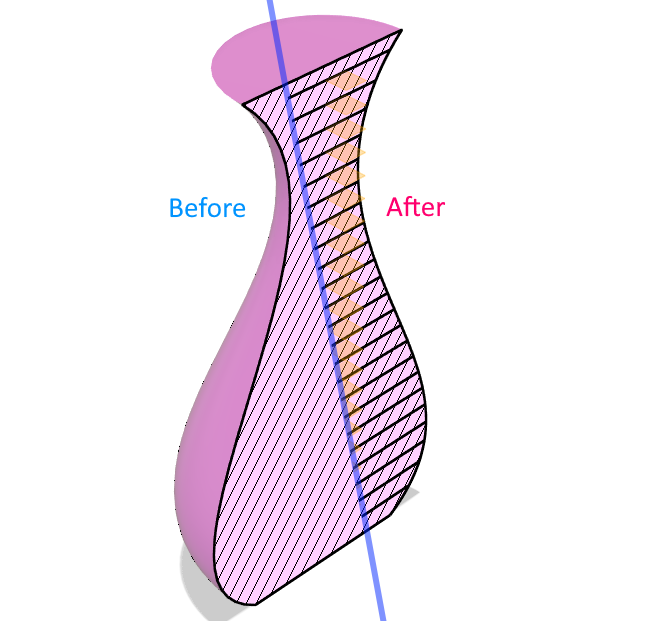
From solid 3D model to laser-cut ready parts
Timeline Organization
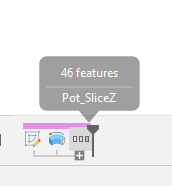
Smart timeline management keeps your project organized
🎯 Use Cases
🏗️ Architecture & Design
- Architectural models with layered sections
- Rapid prototyping with cardboard/plywood
- Exhibition displays and installations
🔬 Education & Research
- STEAM project preparation
- Anatomy models for teaching
- Engineering demonstrations
🎨 Art & Craft
- Custom decorative objects
- Jewelry and accessories
- Artistic installations
🏭 Manufacturing
- Prototype development
- Jigs and fixtures
- Custom packaging solutions
⚙️ Technical Specifications
Requirements
- **Fusion **: Version 2.0.18000 or newer
- Operating System: Windows 10/11, macOS 10.15+
- Memory: 4GB RAM minimum, 8GB recommended
- Storage: 10MB for plugin installation
Supported Materials
- Plexiglass/Acrylic: 1-10mm thickness
- Wood/Plywood: 0.5-20mm thickness
- Cardboard: 1-5mm thickness
- MDF: 2-25mm thickness
- Custom materials: Any thickness 0.1-50mm
Output Format
- Native Fusion bodies
- Ready for CAM operations
- Compatible with all Fusion export formats
🛠️ Advanced Features
Smart Slicing Algorithm
- Intelligent plane generation for optimal cuts
- Precision tolerance control
- Overlap prevention technology
- Edge optimization for clean cuts
Timeline Management
- Automatic grouping of all operations
- Feature naming with logical sequence
- History preservation for easy modifications
- Batch operations support
User Experience
- Real-time feedback on slice count
- Input validation prevents errors
- Progress indication for large models
- Undo/Redo full support
📞 Support
Documentation
- User Guide: [Coming Soon]
- Video Tutorials: YouTube Channel
- FAQ: Common Questions
Community
- Issues: Report bugs
- Discussions: Feature requests
- Email: gianni.tommasi@gmail.com
Professional Support
For commercial projects and custom development:
- Email: gianni.tommasi@gmail.com
- Response Time: 24-48 hours
- Custom Development: Available upon request
📊 Performance
Benchmarks
- Small models (< 1000 faces): < 5 seconds
- Medium models (1K-10K faces): 5-30 seconds
- Large models (10K+ faces): 30-120 seconds
- Complex geometry: Automatic optimization
Limitations
- Maximum slices: 100 per operation (safety limit)
- Model size: Up to 1m³ recommended
- Memory usage: Scales with model complexity
🔒 Privacy & Security
This plugin operates entirely locally within Fusion:
- ✅ No data collection or transmission
- ✅ No internet connection required
- ✅ Your designs stay private on your computer
- ✅ GDPR compliant by design
Full Privacy Policy: jtplugin.github.io/privacy-policy
📈 Roadmap
Version 1.1 (Q2 2025)
- Batch processing multiple bodies
- Advanced nesting algorithms
- Material database integration
Version 1.2 (Q3 2025)
- CAM export integration
- Optimization engine for cut efficiency
- Advanced preview with assembly simulation
Future Versions
- Multi-language support
- Cloud synchronization (optional)
- Integration with popular laser cutting services
🏆 About JT Plugin Development
Giovanni Tommasi - Digital Fabrication Specialist
- 🎓 Expertise in CAD/CAM and digital manufacturing
- 🏭 Professional experience in laser cutting workflows
- 💡 Passionate about making advanced tools accessible
Company: JT Plugin Development Other Projects: Plugin Portfolio
📄 License
Proprietary Software - © 2025 JT Plugin Development
- Commercial use requires license from Autodesk App Store
- Modification and redistribution prohibited
- See LICENSE file for details
⭐ Reviews
“Finally, a professional solution for laser cutting preparation in Fusion!” “Saves hours of manual work - essential for any maker!” “Clean interface, reliable results, exactly what I needed.”
🚀 Ready to revolutionize your digital fabrication workflow?
Get 3D Slicer Pro on Autodesk App Store ← Coming Soon
Made with ❤️ for the Fusion community